Retrieve Data Using Apex Code with Viewer
Supply custom or external data to your Viewer templates by writing an Apex class that implements the Salesforce Callable interface. Viewer calls your class at render time and merges the returned JSON into the template alongside standard Salesforce record data.
- Viewer package installed in your Salesforce org
- Basic knowledge of Apex and Salesforce objects
- At least one Viewer template created and configured
How It Works
When a document is generated, Viewer can call a designated Apex class and pass it context information (record ID, template options). Your class runs any logic you need — a SOQL query, a callout to an external API, a calculation — and returns a JSON-serializable Map. Viewer then makes those values available in your Handlebars template just like any other field.
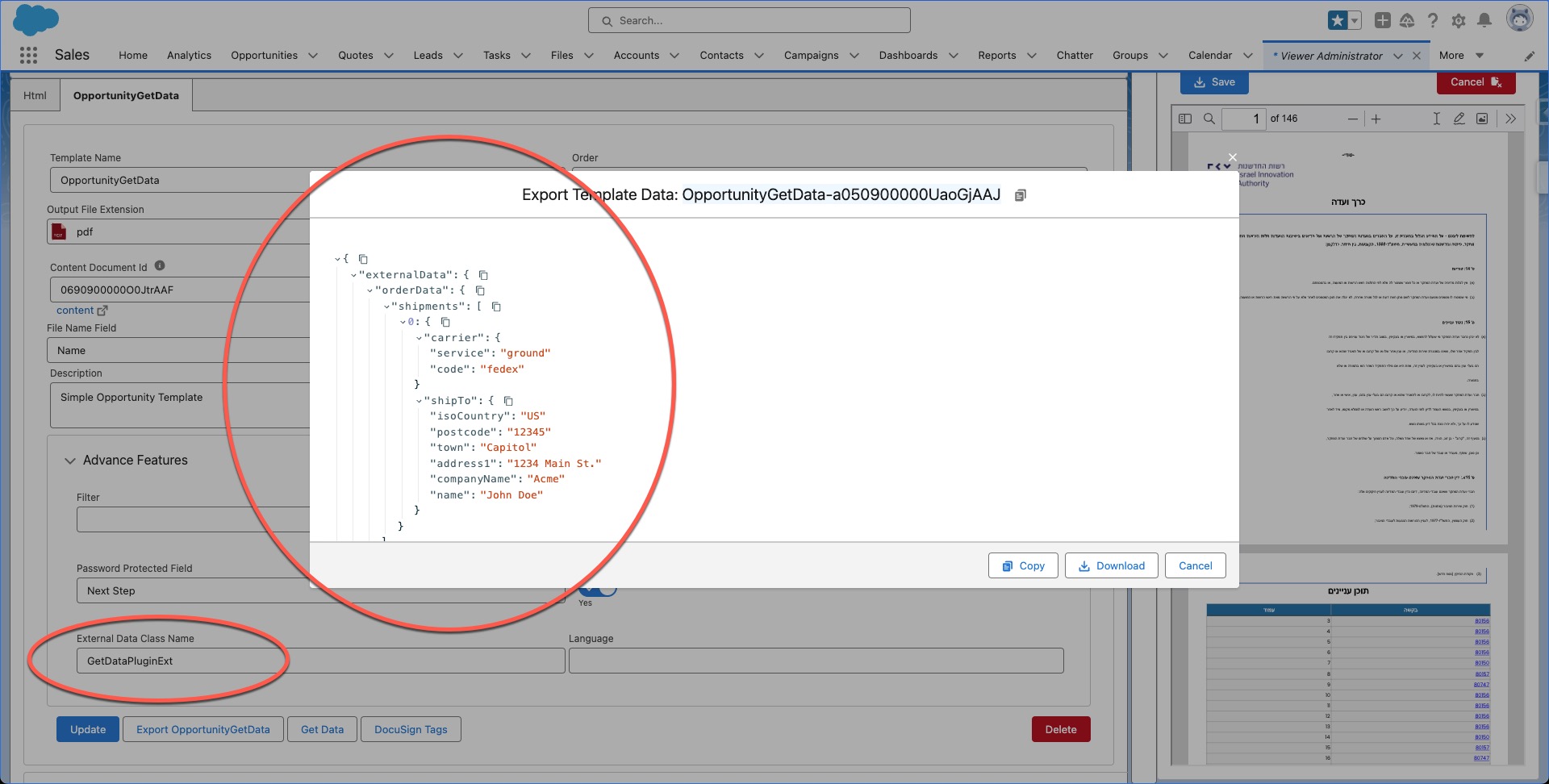
Setup Overview
- Write an Apex class that implements
Callableand returns aMap<String, Object>. - Configure the template — set the External Data Class Name field to your Apex class API name.
- Reference the data in your template using the keys your class returns.
Step 1 — Write the Apex Class
Your class must implement the Callable interface. Viewer invokes getData on your class and expects a JSON-serializable return value.
global with sharing class GetDataPluginExt implements Callable {

    public Object call(String action, Map<String, Object> args) {
        Map<String, Object> input   = (Map<String, Object>) args.get('input');
        Map<String, Object> output  = (Map<String, Object>) args.get('output');
        Map<String, Object> options = (Map<String, Object>) args.get('options');
        return invokeMethod(action, input, output, options);
    }

    private Object invokeMethod(
        String methodName,
        Map<String, Object> inputMap,
        Map<String, Object> outMap,
        Map<String, Object> options
    ) {
        switch on methodName {
            when 'getData' {
                // Example: fetch from an external REST API
                String apiUrl = 'https://dummyjson.com/products/'
                    + String.valueOf(Integer.valueOf(Math.round(Math.random() * 30)));

                HttpRequest req = new HttpRequest();
                req.setEndpoint(apiUrl);
                req.setMethod('GET');
                req.setHeader('Content-Type', 'application/json');
                req.setTimeout(120000);

                HttpResponse res = new Http().send(req);
                Map<String, Object> result =
                    (Map<String, Object>) JSON.deserializeUntyped(res.getBody());

                if (result == null) return null;
                return result;
            }
            when else {
                return null;
            }
        }
    }
}
Return a Map<String, Object> (or any JSON-serializable object). Viewer merges the top-level keys into the template data context, so a map like {'productName': 'Widget', 'price': 99} lets you write {{productName}} and {{price}} directly in your template.
Apex callouts and queries inside a synchronous document generation call are subject to Salesforce governor limits. Avoid heavy computation or large result sets — retrieve only what the template actually needs.
Step 2 — Configure the Template
- Open Viewer → Templates and open your template.
- Find the External Data Class Name field in the template settings panel.
- Enter the Apex class API name — for example,
GetDataPluginExt. - Save the template.
Viewer will call getData on that class whenever this template is rendered.
Step 3 — Use the Data in Your Template
Once the class is configured, the keys returned by your Apex method are available as Handlebars variables in your Word or HTML template:
Common Pattern: Returning SOQL Data
You can use Apex to run complex SOQL queries that are not possible directly in template syntax:
global with sharing class RelatedRecordsPlugin implements Callable {

    public Object call(String action, Map<String, Object> args) {
        Map<String, Object> input = (Map<String, Object>) args.get('input');
        return invokeMethod(action, input);
    }

    private Object invokeMethod(String methodName, Map<String, Object> input) {
        switch on methodName {
            when 'getData' {
                // Read the record ID passed in by Viewer
                String recordId = (String) input.get('recordId');

                List<Map<String, Object>> items = new List<Map<String, Object>>();
                for (OpportunityLineItem oli : [
                    SELECT Name, Quantity, UnitPrice, TotalPrice
                    FROM OpportunityLineItem
                    WHERE OpportunityId = :recordId
                ]) {
                    items.add(new Map<String, Object>{
                        'name'       => oli.Name,
                        'quantity'   => oli.Quantity,
                        'unitPrice'  => oli.UnitPrice,
                        'totalPrice' => oli.TotalPrice
                    });
                }

                return new Map<String, Object>{ 'lineItems' => items };
            }
            when else {
                return null;
            }
        }
    }
}
In your template, iterate with {{#each}}:
Best Practices
- Always return a valid JSON-serializable object —
nullresponses are silently ignored by Viewer. - Use
with sharing— respect Salesforce record-level security in your class. - Handle null results defensively — check that API responses or SOQL lists are not empty before building your return map.
- Write Apex tests — Salesforce requires at least 75% code coverage for deployment; mock HTTP callouts with
HttpCalloutMock. - Avoid heavy processing — keep the data fetch focused on what the template needs to stay within governor limits (CPU time, callout limits, heap size).
Troubleshooting
Template renders blank where external data fields should appear
Causes:
- The External Data Class Name field is empty or set to the wrong API name.
- The class returned
null. - The key name in your map does not match the template placeholder exactly (case-sensitive).
Check:
- Verify the class API name in the template settings.
- Add a
System.debugin your class and view the debug log to confirm the return value. - Confirm your template placeholder
{{myKey}}matches the map key'myKey'exactly.
Callout fails or times out
Causes:
- The external endpoint is not added to Remote Site Settings or Named Credentials.
- The request timeout is too low for the endpoint's response time.
Solution:
- Go to Setup → Remote Site Settings and add the endpoint domain.
- Increase
req.setTimeout()(max 120,000 ms). - Consider caching the result in a Custom Metadata or Platform Cache record for frequently used data.
Governor limit errors during document generation
Cause: The Apex class is performing too many queries or callouts in a single execution.
Solution:
- Reduce the number of SOQL queries — use a single query with relationships instead of multiple queries.
- Retrieve only the fields your template actually uses.
- For heavy operations, consider pre-computing data and storing it on the record before triggering document generation.
Related Topics
- Creating Documents in Salesforce Using Apex - Generate documents programmatically from Apex.
- Trigger Flow to Create Viewer Document - Automate document generation with Flow.
- Viewer Advanced Helpers - Use advanced template helpers for dynamic content.
- Viewer Application Security Blueprint - Understand Viewer's security model.