How to navigate to Viewer
This guide explains how to access the Viewer Administrator in Salesforce.
TL;DR
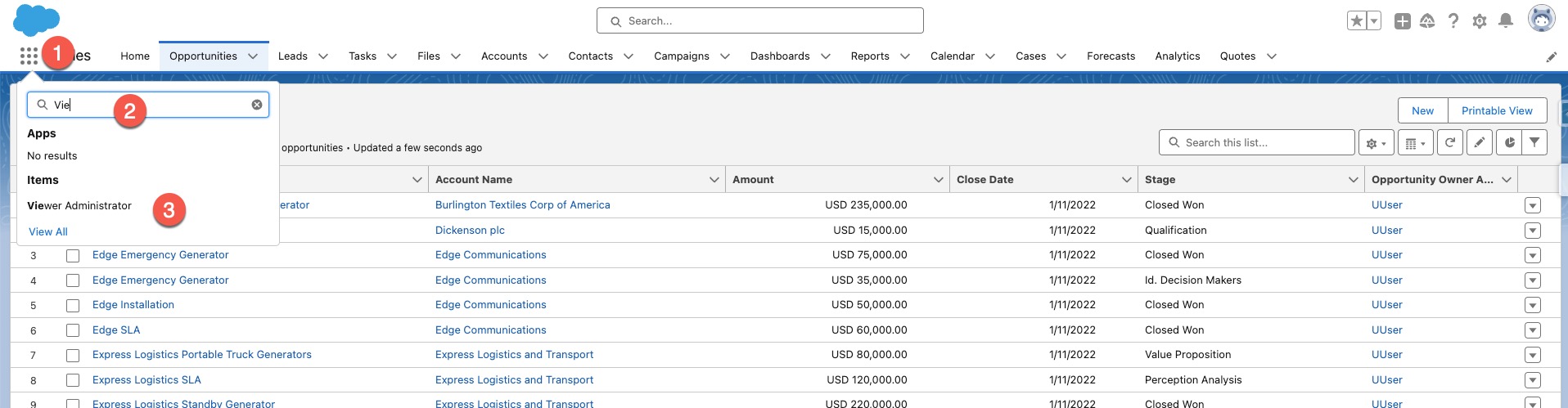
App Launcher → Search "Viewer Administrator" → Open the app
What this helps with
Use this page when you need to quickly find and open Viewer Administrator in Salesforce.
Step-by-step
- Log in to Salesforce.
- Open the App Launcher (grid icon) and search for "Viewer Administrator".
- Click the app to open Viewer Administrator and explore templates and settings.
If you cannot find Viewer Administrator
- Confirm you are logged into the correct Salesforce org.
- Check your user permissions/profile access.
- Clear the App Launcher search and try again.
Next step
- Continue to Using Regions in Viewer App